Generate Ranked Pairs in DAX
- Antriksh Sharma

- Jan 13
- 1 min read
Let's say you want Top 2 Colors of each Brand, how would you do that? Here are different ways of computing that.
Using INDEX & UNION
DEFINE
	VAR Temp =
		ADDCOLUMNS (
			ALL ( Products[Brand], Products[Color] ),
			"@Sales", [Sales Amount]
		)
	VAR Uno =
		INDEX (
			1,
			Temp,
			ORDERBY ( [@Sales], DESC ),
			PARTITIONBY ( Products[Brand] )
		)
	VAR Dos =
		INDEX (
			2,
			Temp,
			ORDERBY ( [@Sales], DESC ),
			PARTITIONBY ( Products[Brand] )
		)
EVALUATE
	UNION ( Uno, Dos )
ORDER BY
	Products[Brand]
Using GENERATE & INDEX
DEFINE
	VAR Temp =
		ADDCOLUMNS (
			ALL ( Products[Brand], Products[Color] ),
			"@Sales", [Sales Amount]
		)
EVALUATE
	GENERATE (
		 { 1, 2 },
		 INDEX (
		 	[Value],
		 	Temp,
		 	ORDERBY ( [@Sales], DESC ),
		 	PARTITIONBY ( Products[Brand] )
		 )
	 )
ORDER BY
	Products[Brand]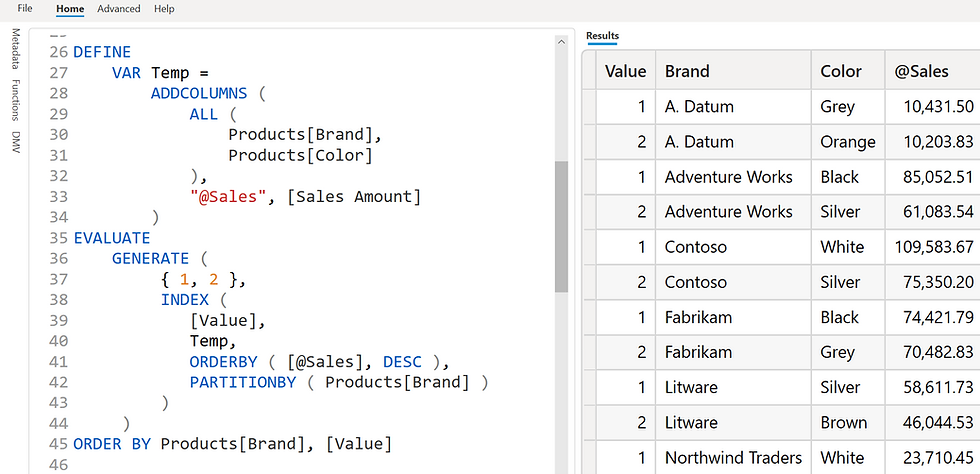
Using WINDOW
DEFINE
	VAR Temp =
		ADDCOLUMNS (
			ALL ( Products[Brand], Products[Color] ),
			"@Sales", [Sales Amount]
		)
EVALUATE
	WINDOW (
		1, ABS,
		2, ABS,
		Temp,
		ORDERBY ( [@Sales], DESC ),
		PARTITIONBY ( Products[Brand] )
	)
ORDER BY
	Products[Brand]
Using TOPNSKIP or TOPN
EVALUATE
	ADDCOLUMNS (
		GENERATE (
			 VALUES ( Products[Brand] ),
			 CALCULATETABLE (
			 	TOPNSKIP (
			 		2,
			 		0,
			 		VALUES ( Products[Color] ),
			 		[Sales Amount],
			 		DESC
			 	)
		 	)
		 ),
		 "@Sales", [Sales Amount]
	 )
using RANK
DEFINE
	VAR Temp =
		ADDCOLUMNS (
			ALL ( Products[Brand], Products[Color] ),
			"@Sales", [Sales Amount]
		)
	VAR ColorRank =
		ADDCOLUMNS (
			Temp,
			"@Rank", RANK (
				SKIP,
				Temp,
				ORDERBY ( [@Sales], DESC ),
				PARTITIONBY ( Products[Brand] )
			)
		)
	EVALUATE
		FILTER ( ColorRank, [@Rank] <= 2 )
ORDER BY
	Products[Brand], [@Rank]


Comments