Get Rows from Previous Partition into Current Partition
- Antriksh Sharma

- 5 hours ago
- 3 min read
Today, I am going to show you how to bring/join the rows of previous partition with the current partition in DAX, with the metrics for the previous rows in the current time frame.
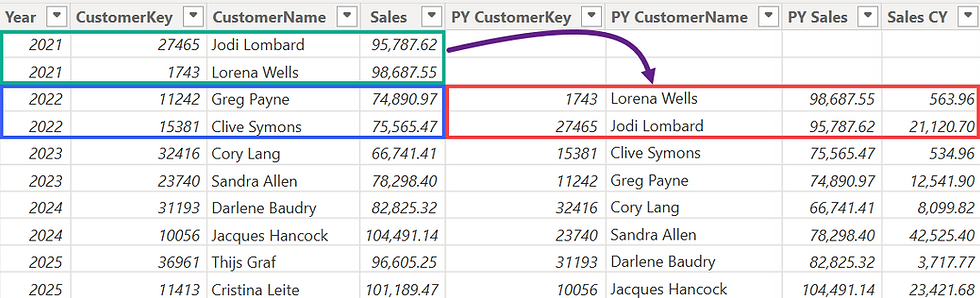
From the above image you can see there are 2 Customers in 2021 that are brought forward into 2022 with their Sales in 2021 and Sales in 2022.
First order of business is to get TOPN Customers in each year and for that we can use TOPN paired with GENERATE or with WINDOW
VAR N = 2
VAR TopCustomersEveryYear =
    ADDCOLUMNS (
        GENERATE (
            SUMMARIZE ( Sales, Dates[Year] ),
            TOPN (
                N,
                ALL ( Customer[CustomerKey], Customer[CustomerName] ),
                [Sales Amount]
            )
        ),
        "Sales", [Sales Amount]
    )
This code returns a table partitioned by year containing Customers sorted by Sales Amount in DESC order
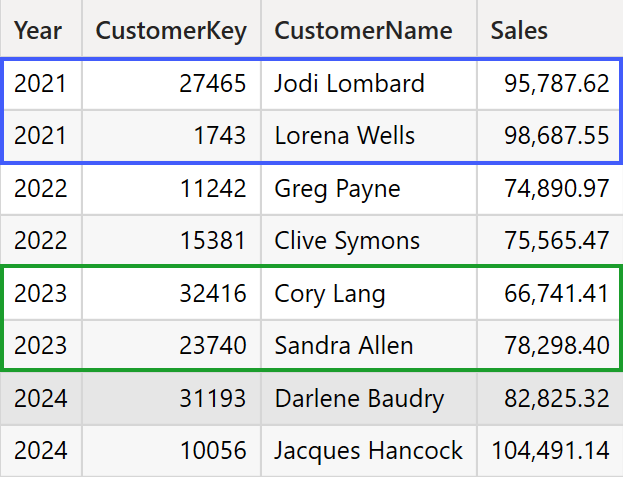
You can achieve the same result with WINDOW as well.
WINDOW (
	1, ABS,
	2, ABS,
	ADDCOLUMNS (
		SUMMARIZE (
			Sales,
			Dates[Year],
			Customer[CustomerKey],
			Customer[CustomerName]
		),
		"Sales", [Sales Amount]
	),
	ORDERBY ( [Sales], DESC ),
	PARTITIONBY ( Dates[Year] )
)
Now we need to access previous N rows from the table above row by row for the current partition and for that we are going to use GENERATEALL and OFFSET.
GENERATEALL ensures that if the table on LEFT doesn't have a match then that row is still returned i.e. the first 2 rows and OFFSET is a Window function that uses concept of CURRENT ROW or in simple words moves back and forth using a relative position.
VAR Customers_PY =
    GENERATEALL (
        TopCustomersEveryYear,
        SELECTCOLUMNS (
            OFFSET (
                -N,
                TopCustomersEveryYear,
                ORDERBY ( Dates[Year], ASC )
            ),
            "PY CustomerKey", Customer[CustomerKey],
            "PY CustomerName", Customer[CustomerName],
            "PY Sales", [Sales]
        )
    )
For each row supplied by GENERATEALL, OFFSET gets the -N row from previous partition, now I know I keep saying partition even though if you change N to 1 it will get the row from the current partition but that's the nature of Window functions, you won't be able to jump partitions if you use PARTITIONBY
We use SELECTCOLUMNS because we can't output 2 columns with same lineage and same name, and to make it explicit that the new columns are from Previous Year's partition.
Now the only thing remaining to be done is to compute metrix for previous rows in the current context in our case the Year on the current row.
VAR PY_CustomerSales_In_CY =
    ADDCOLUMNS (
        Customers_PY,
        "Sales CY", CALCULATE (
            [Sales Amount],
            TREATAS ( { [PY CustomerKey] }, Customer[CustomerKey]  ),
            REMOVEFILTERS ( Customer )
        )
    )
We use REMOVEFILTERS to remove the context transition from customers in the current row so that they don't intersect with customers from previous rows.
Then we use TREATAS and take the CustomerKey from previous partition and inject that into Filter Context to compute the Sales of Customers from previous rows in the Year that is on the current row.
Complete DAX code:
PreviousYearCustomers =
VAR N = 2
VAR TopCustomersEveryYear =
    ADDCOLUMNS (
        GENERATE (
            SUMMARIZE ( Sales, Dates[Year] ),
            TOPN (
                N,
                ALL ( Customer[CustomerKey], Customer[CustomerName] ),
                [Sales Amount]
            )
        ),
        "Sales", [Sales Amount]
    )
VAR Customers_PY =
    GENERATEALL (
        TopCustomersEveryYear,
        SELECTCOLUMNS (
            OFFSET (
                -N,
                TopCustomersEveryYear,
                ORDERBY ( Dates[Year], ASC, Customer[CustomerKey], ASC )
            ),
            "PY CustomerKey", Customer[CustomerKey],
            "PY CustomerName", Customer[CustomerName],
            "PY Sales", [Sales]
        )
    )
VAR PY_CustomerSales_In_CY =
    ADDCOLUMNS (
        Customers_PY,
        "Sales CY", CALCULATE (
            [Sales Amount],
            TREATAS ( { [PY CustomerKey] }, Customer[CustomerKey]  ),
            REMOVEFILTERS ( Customer )
        )
    )
RETURN PY_CustomerSales_In_CY


Comments