Generate Large Sales Dataset with Python
- Antriksh Sharma

- Jan 9
- 2 min read
Updated: Jan 13
Today I’m going to show you an application I built with the help of ChatGPT that generates large volumes of Sales data based off of Microsoft's ContosoRetailDW model.
The generator allows users to export data in CSV (for direct consumption or bulk inserts into SQL), Parquet, or Delta Parquet formats for ingestion into Microsoft Fabric.
The project is available on GitHub at - https://github.com/SharmaAntriksh/synthetic-data-generator
Data Model:

It deliberately inclines towards Snowflake schema and complicated relationships to make the model more realistic and something that you would encounter everyday, Star Schema sounds cool and is fun to work with, but you can't always have a perfect situation!
Features:
Generate hundreds of millions of rows at high speed, with automatic parallelization across CPU cores.
Sales - Control inclusion of columns like SalesOrderNumber and SalesLineNumber with a boolean flag
Generate any number of rows in Products, Customers, Stores, Promotions, to test different scenarios as per your requirements.
Currency and Exchange Rate uses yahoo for old or new exchange rates
Output data in CSV, Parquet, or Delta Parquet.
Skip regeneration of Dimensions with Versioning if config doesn't changes so that dimensions remain same even if Sales table has 1M, 10M, 100M or a billion rows.
How to use:
Clone the project or download it, make sure Python is installed on your machine.
git clone https://github.com/SharmaAntriksh/synthetic-data-generator.git
cd synthetic-data-generator
launch powershell in adminstrator mode and run
Set-ExecutionPolicy Bypass -Scope CurrentUser -Forcethen in powershell run create_venv.ps1 which will create a virtual environment install required libraries and activate it.
.\scripts\create_venv.ps1Update virtual environment (if required):
.\scripts\sync_venv.ps1Activate virtual environment:
. .\scripts\activate_venv.ps1Edit parameters in run_generator.ps1 and execute:
.\scripts\run_generator.ps1Or run directly via CLI:
python main.py --format csv --skip-order-cols false --sales-rows 4351 --customers 800 --stores 300 --products 500 --promotions 150 --start-date 2023-06-01 --end-date 2024-12-31 --workers 6 --chunk-size 2000000 --clean
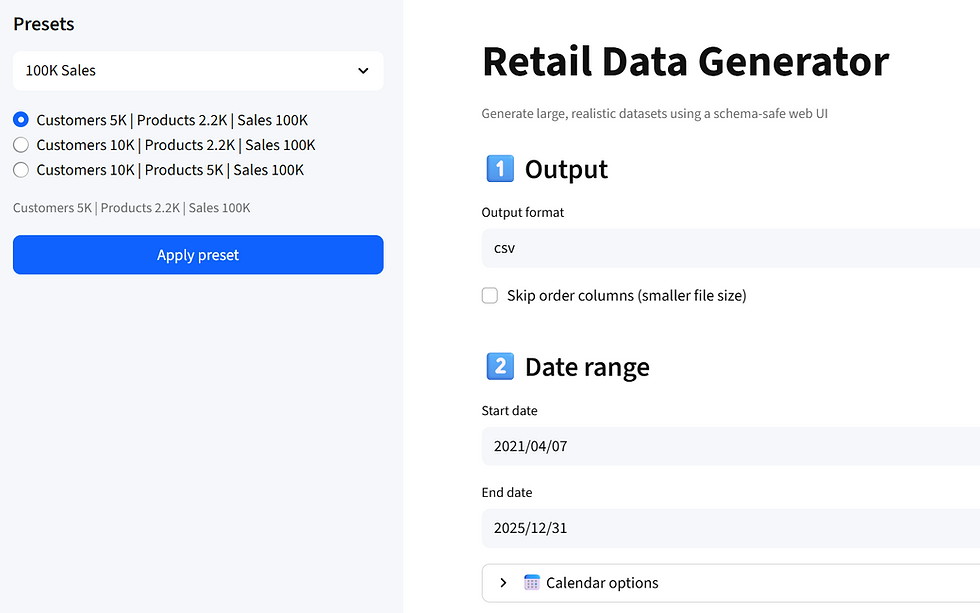
There is also feature to generate the dataset with UI, and I have provided many presets as well:
Presets and UI:
Pipeline status:

Output:

Performance Benchmarks for 100M Sales, 5.1M Customers, 300K Products with RowGroupSize = 2M
-- Full Regen + 3.5Ghz CPU Capped
0:02:11 (2M Chunk, 8 Workers)
-- No Dimemsion Regen + 3.5Ghz CPU Capped
0:01:39 (2M Chunk, 8 Workers)
0:01:36 (2M Chunk, 12 Workers)
-- No Dimemsion Regen + CPU at 5.1Ghz
0:01:15 (2M Chunk, 12 Workers)
-- Full Regen + CPU at 5.1Ghz
0:01:38( 2M Chunk, 8 Workers)
-- Full Regen + CPU at 5.1Ghz + No SalesOrder/LineNumber Columns
0:01:23 (2M Chunk, 10 Workers)
-- No Dimemsion Regen + CPU at 5.1Ghz + No SalesOrder/LineNumber Columns
0:01:00 (2M Chunk, 10 Workers)
I hope this generator helps you!

Comments